Building Agent Orchestra: A Step-by-Step Guide to Designing a Multi-Agent AI Research System
Modern research workflows are often fragmented: one tool for search, another for reading sources, another for writing, and a final pass for quality review. Agent Orchestra was built to solve that fragmentation by turning research into a coordinated, autonomous pipeline. Instead of manually switching contexts, the user enters a topic once and receives a complete report, plus critique, in one continuous flow.
This article walks through the project step by step, from idea to architecture, implementation, frontend design, and deployment readiness. If you are building AI products, this project is a practical case study in combining language models, tools, and UX into a cohesive system.
Step 1: Define the Problem and Product Goal
The first step was clarifying the exact outcome the product should deliver. The target was not “chat with AI,” but “produce a research report with evidence-backed depth.” That distinction changed everything. It meant the system needed:
- Live web retrieval, not just model memory.
- Source extraction that reads actual content, not snippets.
- Structured writing with coherent sections.
- A quality control pass before delivery.
- A usable interface that shows progress transparently.
The core product goal became: convert a user topic into a polished markdown report through a chain of specialized agents, each handling one responsibility.
Step 2: Choose a Multi-Agent Pattern Instead of a Single Prompt
A single large prompt can generate decent text, but it struggles with reliability when the task has multiple cognitive stages. Agent Orchestra uses a role-based architecture: each agent has a narrow scope and a clear contract. This improves control, debuggability, and output consistency.
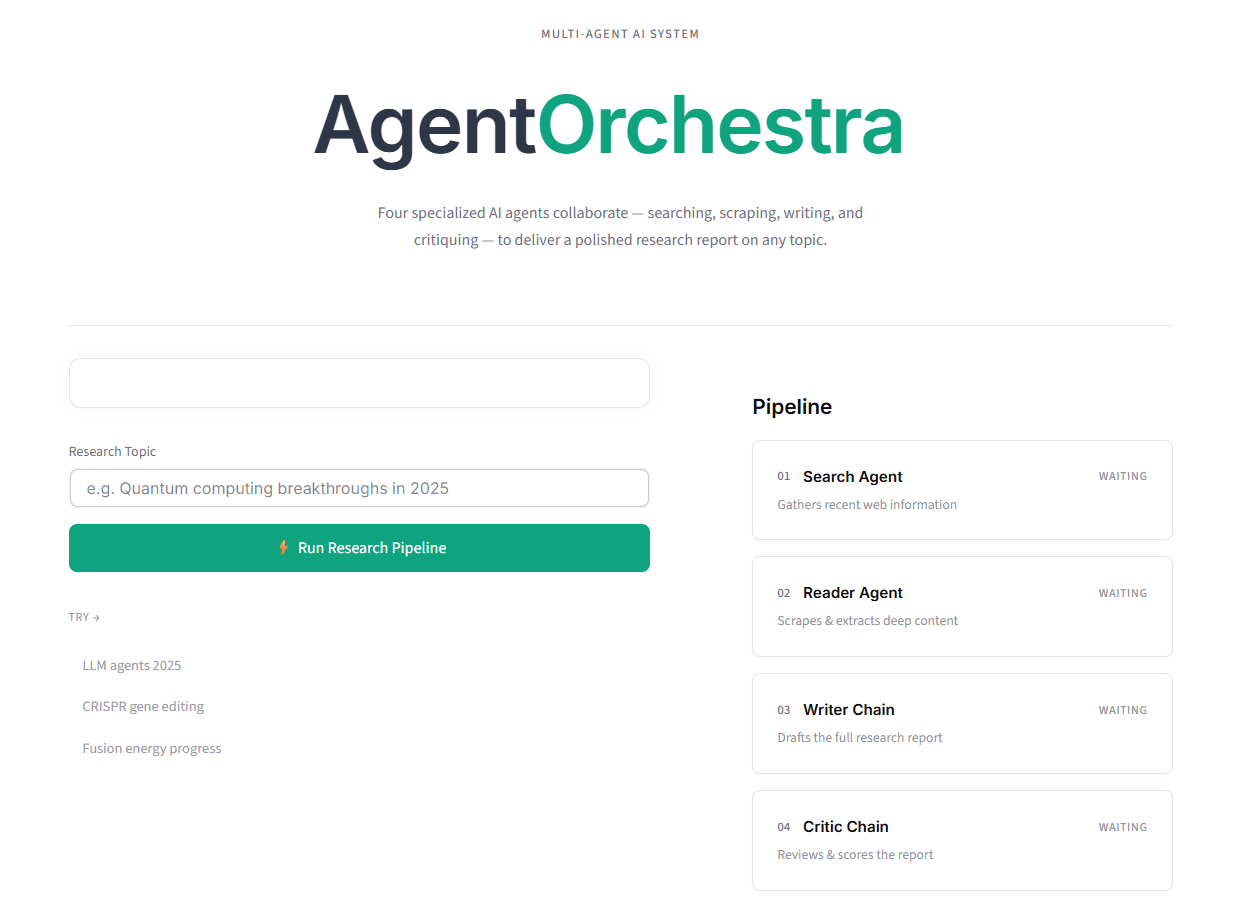
The selected pipeline contains four stages:
- Search Agent: gathers recent, relevant sources.
- Reader Agent: extracts deep content from selected pages.
- Writer Chain: synthesizes findings into a report.
- Critic Chain: evaluates the report and returns feedback.
This decomposition reduces prompt overload and makes each stage testable in isolation.
Step 3: Build the Tooling Layer for Real-World Data
Language models are only as useful as their inputs. For a research assistant, current data is mandatory. The project integrates a search API and custom scraping tools.
The tooling stack includes:
- Tavily API for search relevance and recency.
- Requests for fetching page content.
- BeautifulSoup + lxml for parsing and extraction.
- Validation logic to avoid empty or noisy pages.
A crucial design decision was to treat tool output as structured intermediate state, not final text. Search results are passed to the Reader Agent, and extracted content is passed to the Writer Chain. This creates traceability and minimizes hallucination risk.
Step 4: Design Each Agent’s Responsibility and Prompt Contract
Each agent was implemented with one job and one output style. This prevented role overlap and made error handling easier.
Search Agent contract:
- Input: user topic.
- Output: relevant links and concise context.
- Constraint: prioritize reliability and recency.
Reader Agent contract:
- Input: search output.
- Output: deeper, cleaned source content.
- Constraint: avoid irrelevant page elements and filler.
Writer Chain contract:
- Input: combined search + reader context.
- Output: well-structured markdown report.
- Constraint: clarity, sectioning, evidence-based claims.
Critic Chain contract:
- Input: writer output.
- Output: strengths, weaknesses, and score-oriented feedback.
- Constraint: actionable critique, not vague commentary.
This contract-first approach made prompt engineering cleaner because each agent prompt focused on one cognitive operation.
Step 5: Orchestrate the Pipeline Flow and State Transitions
Once agent roles were stable, orchestration became the backbone. The execution model is sequential and deterministic: each completed step unlocks the next one. This produces predictable behavior and straightforward UI synchronization.
Pipeline sequence:
- Run search.
- Persist search output to session state.
- Run reader using search context.
- Persist reader output.
- Run writer using combined context.
- Persist report.
- Run critic using report.
- Persist feedback and mark completion.
State keys were designed around two concerns: process status and artifact storage. Process flags (running, done) control UI behavior, while results stores stage outputs. This separation prevented mixed logic and improved maintainability.
Step 6: Build a Frontend That Makes AI Work Visible
A major value of Agent Orchestra is transparency. Instead of showing a spinner with no context, the interface displays each pipeline stage and its status transitions: waiting, running, done.
The frontend uses Streamlit with custom CSS/HTML injection for brand-level control. The layout follows a two-column approach:
- Left: topic input and action controls.
- Right: pipeline tracker with live stage cards.
When the user starts execution, each stage updates in real time. This visual progression improves trust and makes the system feel deterministic rather than opaque. It also helps debugging because you immediately see where latency or failure occurs.
The interface also includes:
- Themed headings for final report and critique.
- Expandable raw output sections for search and scraped content.
- Download button for markdown export.
- Centered hero section and cohesive light theme styling.
Step 7: Implement Real-Time Rendering in a Synchronous Framework
Streamlit reruns scripts top to bottom, which can make multi-step UX tricky. A key technical challenge was forcing visible progress after each agent completes rather than only at the end.
The solution was to use:
- Session state as persistent memory between reruns.
- Placeholder containers (
st.empty) for controlled section updates. - Explicit rerun strategy to refresh pipeline visuals at each stage boundary.
After each stage finishes, the corresponding result is stored and the pipeline renderer is called again. This pattern creates stepwise feedback while preserving a simple synchronous execution model.
Step 8: Improve Output Quality with a Built-In Critique Loop
Most AI demos stop at generation. Agent Orchestra adds a critique phase to improve reliability and user confidence. The critic is not merely decorative; it is a quality gate that surfaces weaknesses in argumentation, completeness, or factual grounding.
Benefits of this step:
- Users get meta-feedback, not just final text.
- Weak sections become visible for revision.
- The product demonstrates self-evaluation capability.
This also creates a future path for iterative refinement, where critic output can feed back into a second writer pass. Even without full auto-rewrite, the critique step already adds substantial product value.
Step 9: Polish UX and Content Hierarchy for Readability
Research tools succeed or fail on readability. The project invested heavily in visual hierarchy to make long-form output digestible:
- Distinct themed headings for major sections.
- Controlled spacing and reduced content gaps in expandable panels.
- Compact typography for raw outputs and broader spacing for report blocks.
- Consistent accent color across controls and labels.
An important change was reorganizing section order for cognitive flow:
- Final Research Report first.
- Download action immediately below.
- Raw source outputs next.
- Critic feedback after source context.
This mirrors how users consume information: answer first, evidence second, review third.
Step 10: Document the Project for Portfolio and Collaboration
A technically strong project needs professional presentation. The README was rewritten to reflect production standards with:
- Clear overview and value proposition.
- Feature breakdown by pipeline stage.
- Setup instructions with environment variables.
- Project structure map.
- Contribution and license sections.
This documentation layer turns a personal build into a shareable engineering artifact. It also helps recruiters and collaborators assess scope, design thinking, and execution depth quickly.
Engineering Decisions That Mattered Most
Several decisions had outsized impact:
- Role-specific agents over monolithic prompting.
- Tool-augmented retrieval over pure model memory.
- Stateful UI updates over one-shot rendering.
- Critic stage for quality assurance.
- Markdown export for practical usability.
Together, these transformed the app from a prototype chat interface into a true workflow product.
Challenges and How They Were Solved
Challenge 1: Runtime import and wiring issues
During refactors, missing imports can break execution instantly. The fix was strict module boundaries and explicit imports for every builder and chain used in the app layer.
Challenge 2: UI not updating stage-by-stage
Synchronous reruns initially delayed visible pipeline transitions. The fix was session-state-driven rendering with incremental updates after each agent invocation.
Challenge 3: Styling limitations in default Streamlit components
Default styles were insufficient for a polished brand. The fix was controlled CSS overrides and lightweight custom HTML wrappers while keeping Streamlit ergonomics.
Challenge 4: Raw content verbosity
Scraped content can overwhelm users. The fix was expandable raw sections with tighter spacing and clearer heading hierarchy.
Lessons Learned
- Multi-agent systems are most effective when each agent has a narrow, explicit contract.
- Real-time UI transparency significantly improves trust in AI workflows.
- Tool reliability is as important as model quality in research use cases.
- A critique stage is a practical way to improve perceived and actual output quality.
- Product polish and documentation are not optional if the goal is portfolio-grade work.
Final Outcome and Why This Project Stands Out
Agent Orchestra demonstrates full-stack AI engineering in a compact but meaningful scope. It combines model orchestration, tool integration, stateful frontend behavior, and UX refinement into one coherent product. The system does not just generate text; it performs a reproducible research process and shows every stage of that process to the user.